Wage Calculator
A prevailing wage calculator built into your estimate
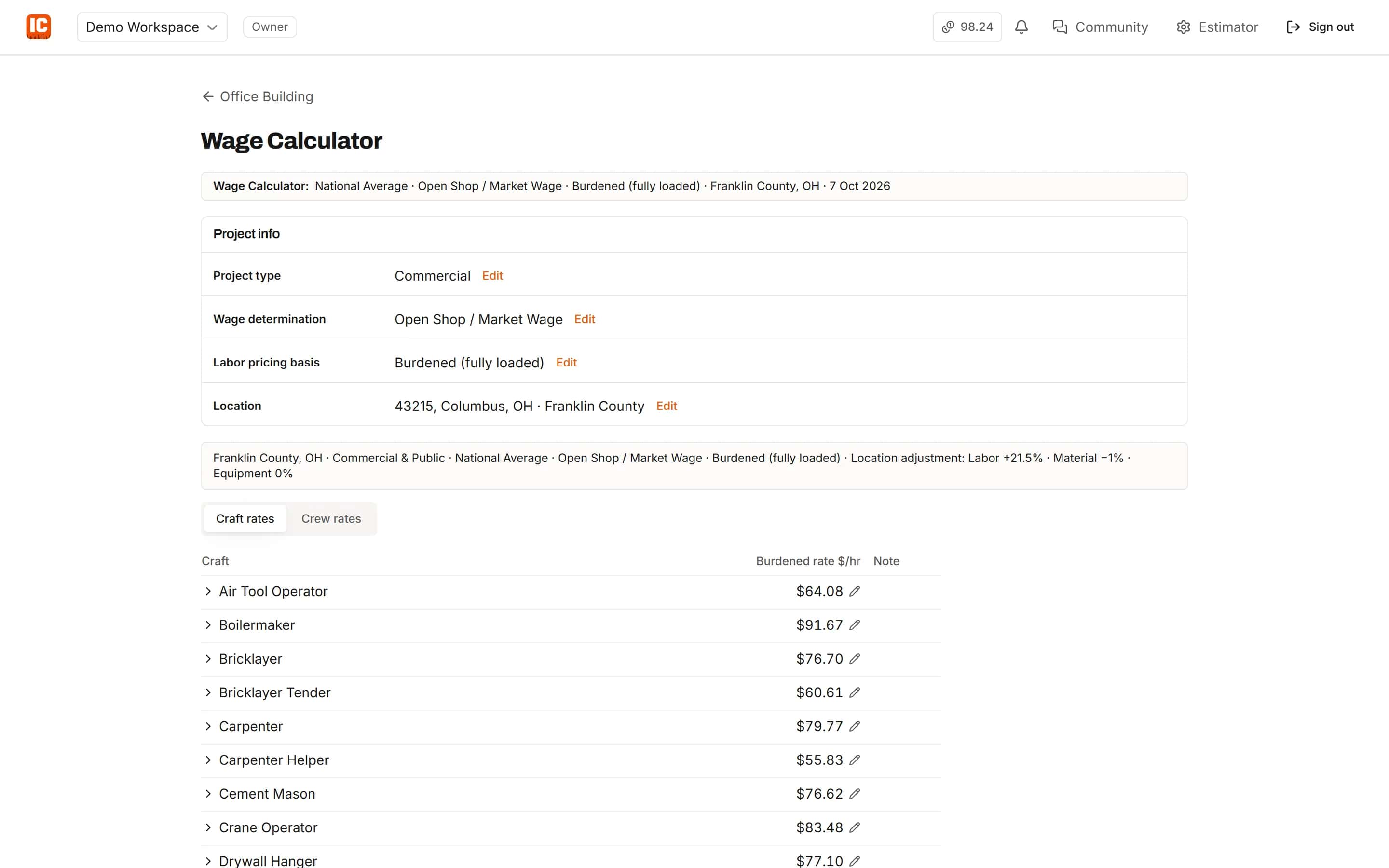
Pick the project type, the wage determination and how you price labor. IntelCost works out a burdened or direct rate for every craft, adjusts it to the project's county, and saves it with the project so your labor lines and crews use it.
Start your free trial. No card required.
Wage determinations
Open shop, Davis-Bacon, state or union
Choose Open Shop, Prevailing Wage Federal (Davis-Bacon), Prevailing Wage State or Local, or Union. Each one decides what goes into a rate, including fringe and whether a legal minimum applies.
- Burdened (fully loaded) or direct labor pricing
- Under direct pricing, the burden shows as its own line in the bid summary
- On public jobs, rates never drop below the wage determination
Location adjustment
Adjusted to the project's county
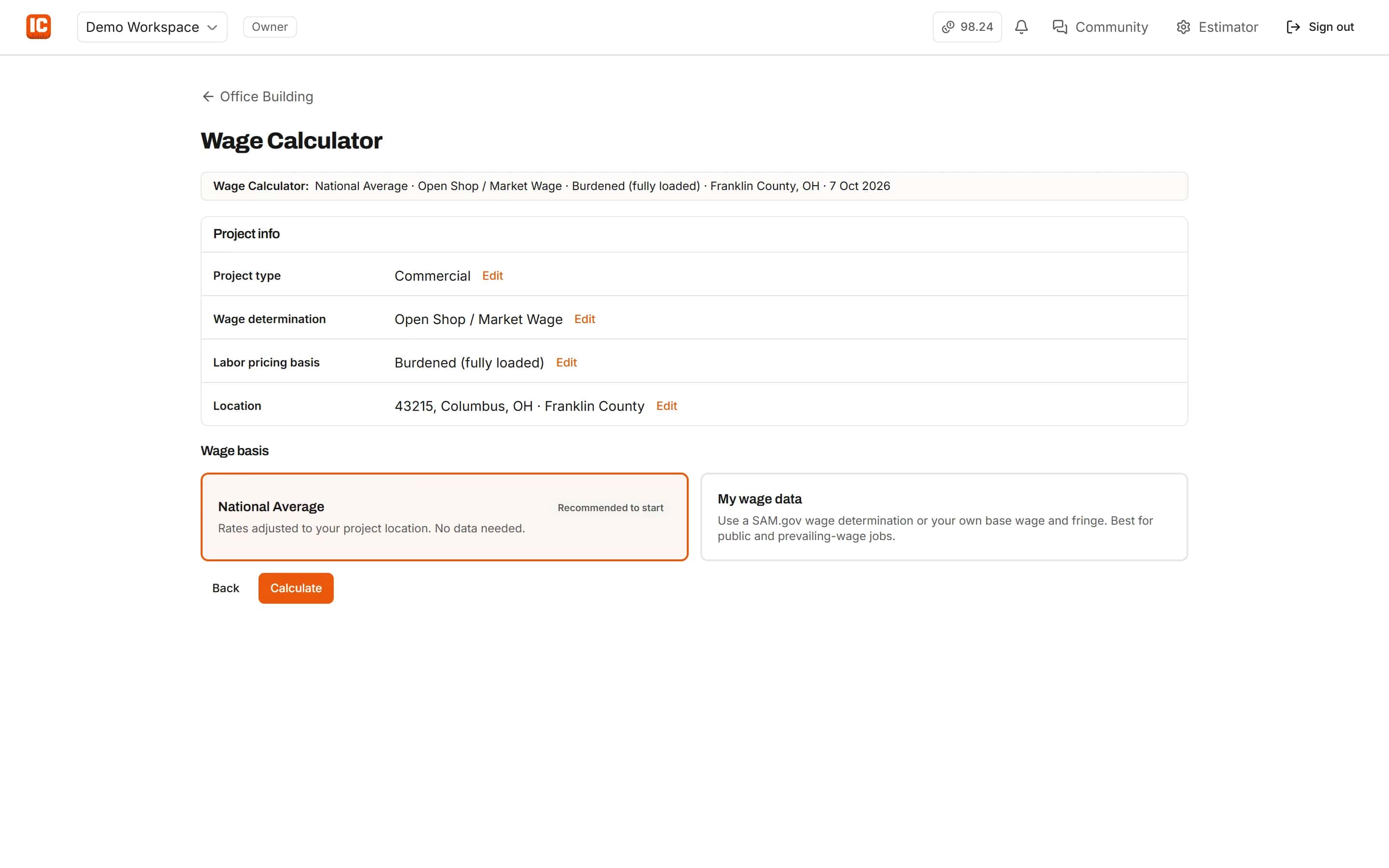
Enter the ZIP and IntelCost finds the county, asking which one when a ZIP crosses county lines. The labor, material and equipment adjustments are shown separately, so you know exactly what moved.
- National average rates adjusted to the location, with no data needed
- Or use your own wage data
- Override any rate for the project
Davis-Bacon wage estimating
Bring the wage determination, skip the typing
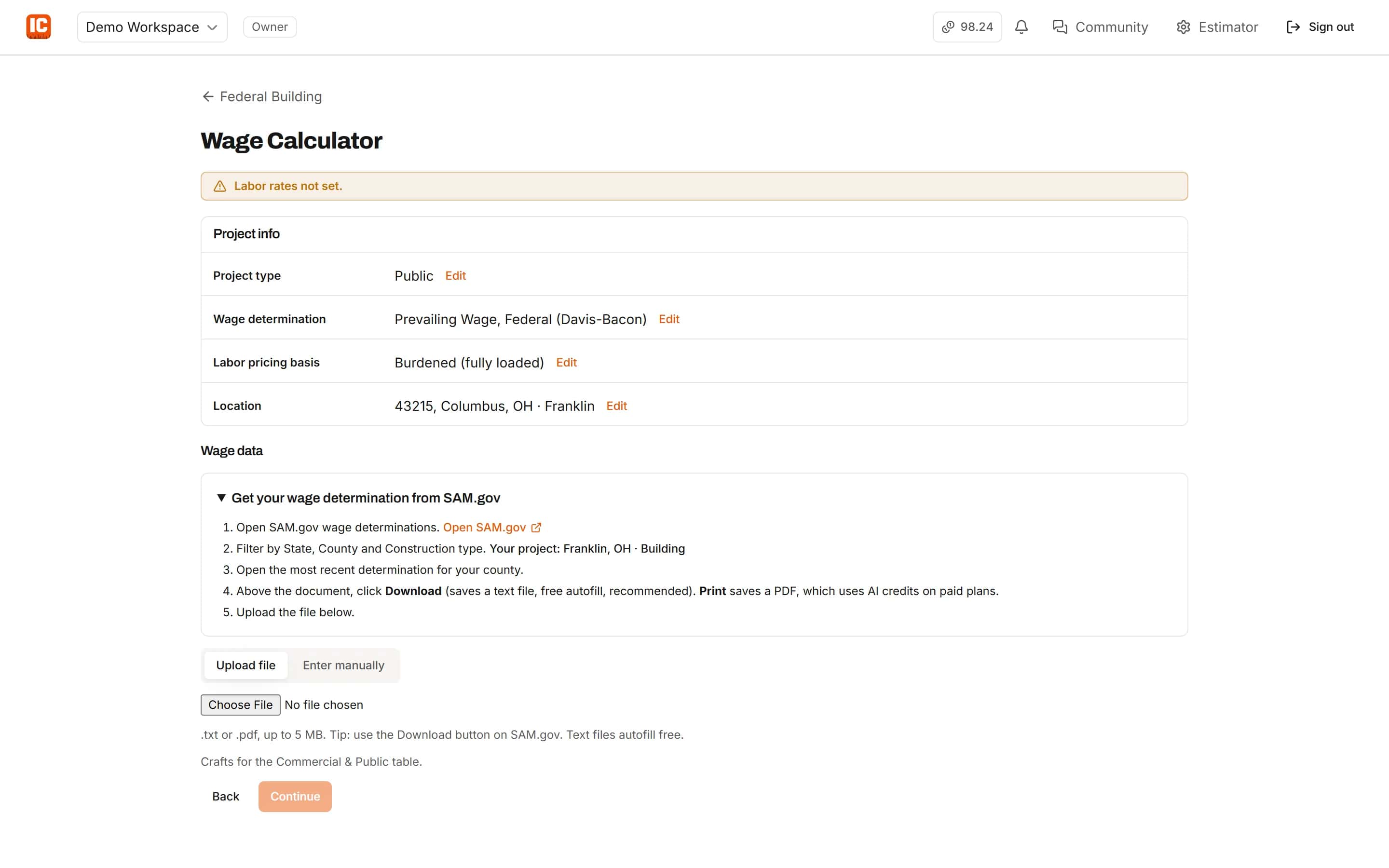
Upload the wage determination text file from SAM.gov and IntelCost fills base and fringe for each craft it matches. Professional subscribers can also read a PDF determination, with AI used only after you confirm.
- SAM.gov text files read free
- Fill crafts the determination does not list from the national average, or leave them out
- Rates saved as a snapshot: later changes never alter a saved project
Crews
Crews that follow the work
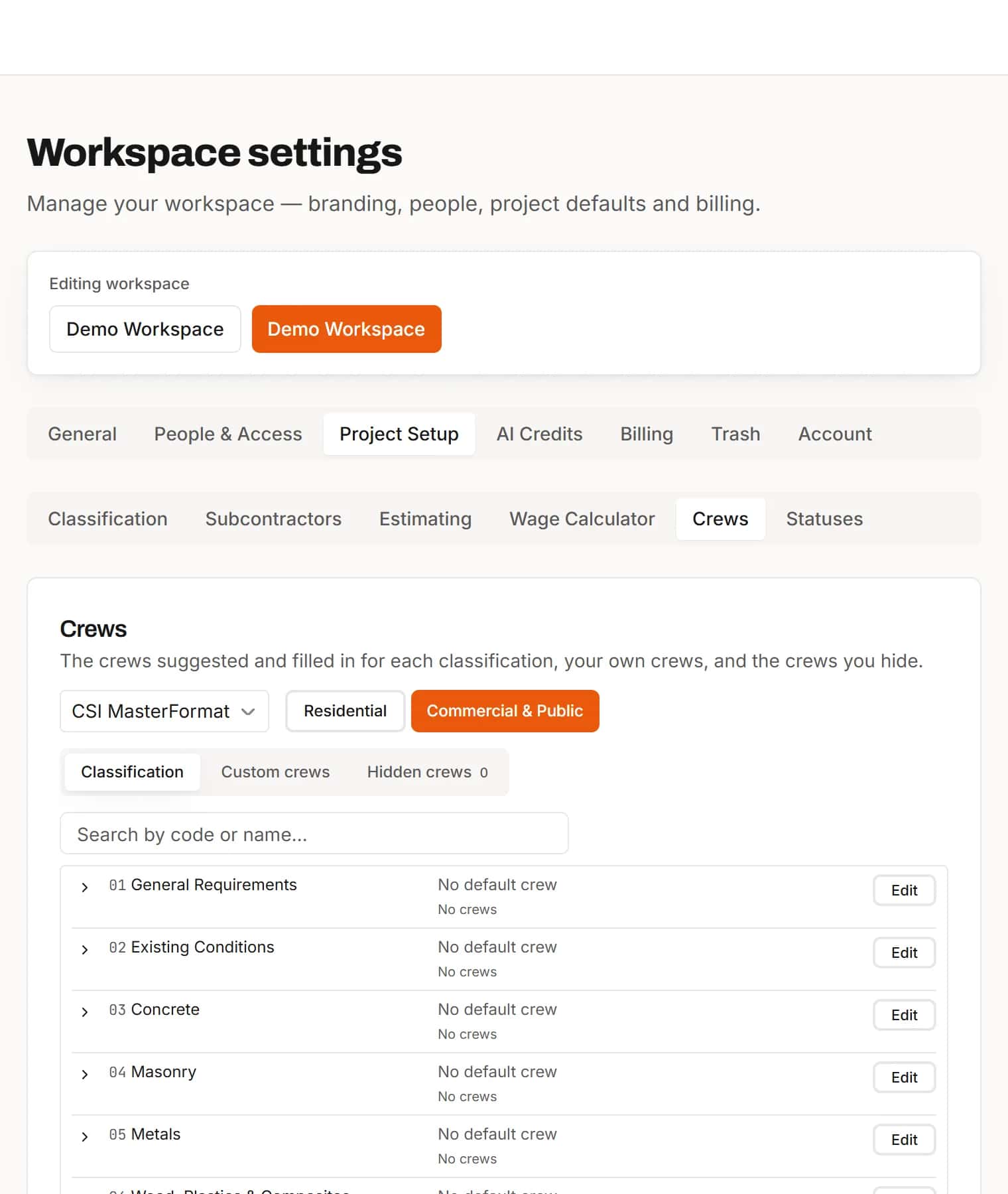
Labor on a classified item gets a suggested crew for that scope, priced at the project's saved rates. Set your own crew lists for the workspace, make custom crews and hide the ones you never use.
- Suggested crews for each scope
- Custom crews for your firm
- Crew cost per man-hour and per crew-hour
Your company burden
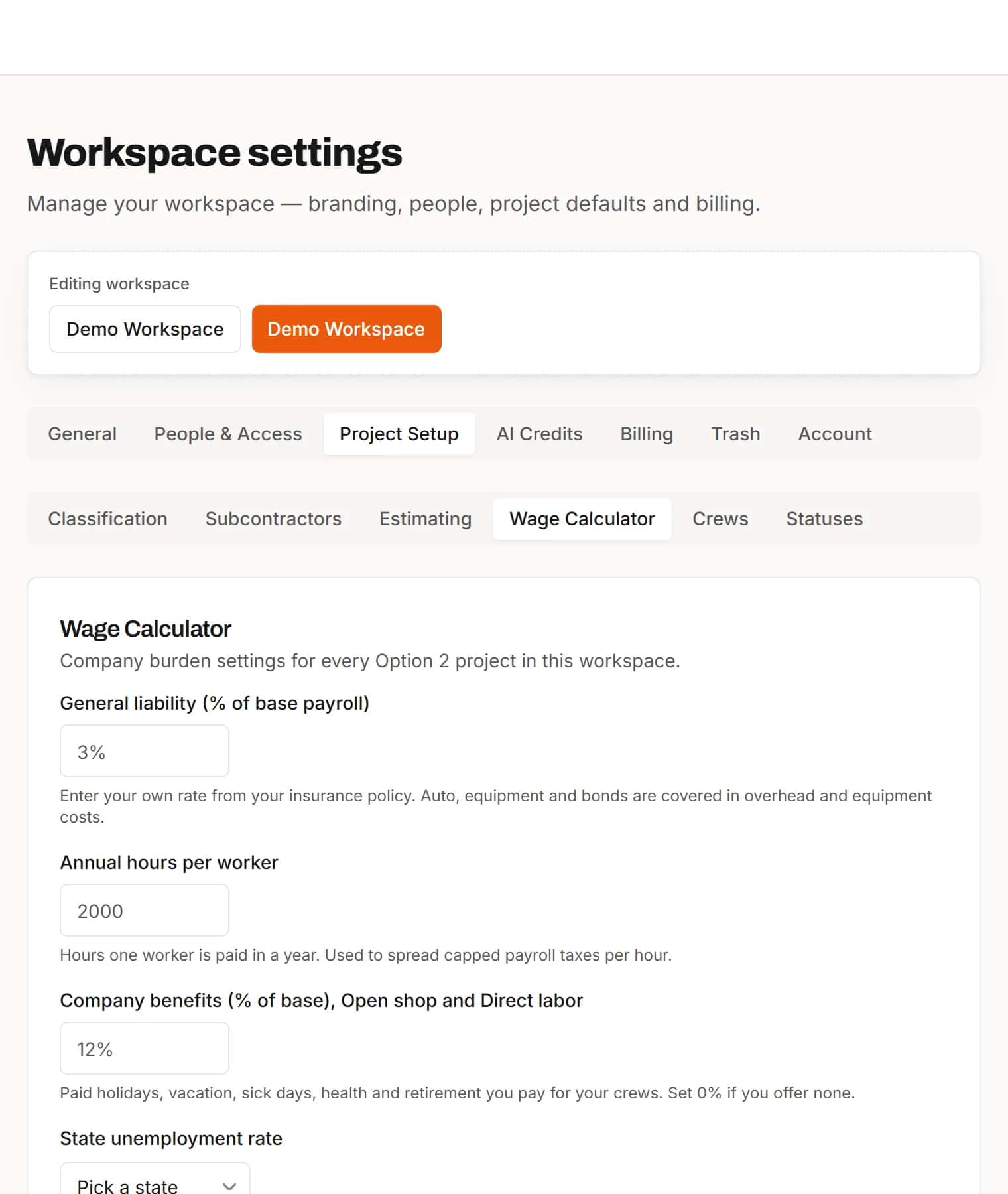
Your insurance, unemployment and workers' comp rates
Set general liability, annual hours, state unemployment and workers' comp rates once for the workspace. Every project's rates use them, and you can recalculate open projects after a change.
- Workers' comp per $100 of base payroll
- Recalculate open projects in one step
In the estimate
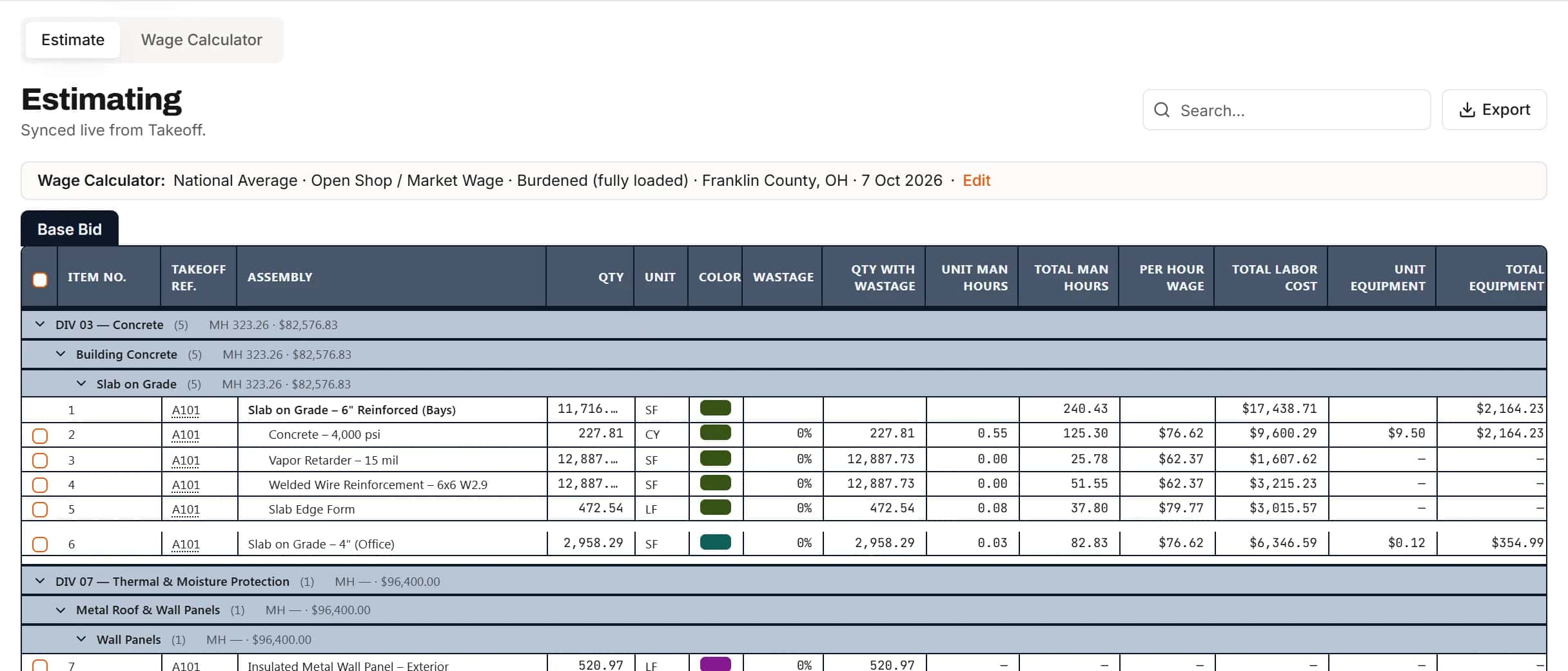
Labor lines that know which rates they use
A strip above the estimate shows the saved rate set: basis, wage determination, pricing and county. Labor lines and crews follow it until you choose otherwise.
- Edit the rate set from the estimate
- Your own rate on any line when a job needs it
How it works
- 1
Set the project
Project type, wage determination, pricing basis and ZIP.
- 2
Choose the basis
National average for the location, or your own wage data.
- 3
Save to the project
Labor lines and crews in the estimate use the saved rates.
Frequently asked questions
Does the Wage Calculator handle Davis-Bacon prevailing wage jobs?
Yes. Choose Prevailing Wage, Federal (Davis-Bacon). Upload the wage determination text file from SAM.gov to fill base and fringe for each craft, or enter them yourself.
Can I price labor as direct wages with burden as a separate line?
Yes. Choose Direct Labor as the pricing basis. Rates show the payable wage, and the labor burden appears as its own line in the bid summary.
Do saved rates change when the calculator is updated later?
No. A project's rates are saved as a snapshot. Nothing recalculates without you confirming it.
Can I override a rate?
Yes. Any craft rate can be replaced with your own for the project, and it is marked as your rate.
Does it work for state and local prevailing wage jobs?
Yes. Choose Prevailing Wage, State/Local. Enter the rates from the state's wage schedule yourself, or, on a paid Professional plan, read them from a PDF.
What if my ZIP code covers more than one county?
IntelCost asks which county the project is in and uses that county for the location adjustment.
Learn more
Guides for the work behind this feature, useful whatever software you use.
- GuideBurdened vs Direct Labor Rate: What Goes Into Each and How to Calculate BurdenWhat separates a direct wage from a fully burdened labor rate, how to work out your burden percentage, and where to carry it in a bid.Read the guide
- GuideHow to Read a Davis-Bacon Wage DeterminationWhere wage determinations are published, how each part of one reads, and how to turn a classification line into a bid labor rate.Read the guide
Related features
- EstimatingPrice every takeoff item with labor, material, equipment and sub quotes, up to the bid total.Learn more
- ClassificationsFile every item under CSI MasterFormat, UniFormat or NRM as you measure.Learn more
- TakeoffMeasure lengths, areas and counts on your plans, with every sheet at its own scale.Learn more
- Excel exportExport the estimate with live formulas, linked quantities and a bid summary sheet.Learn more
Bring your next bid set.
Upload the drawings, set the scale and measure your first item in the same sitting. Your projects live in the cloud, so the whole team opens the same set from any computer.
Start your free trial. No card required.