Comparison
Excel Takeoff vs Takeoff Software: When a Spreadsheet Is Enough
A decision guide: the jobs where a spreadsheet takeoff holds up, the ones where it does not, and how to keep Excel at the end either way.
By IntelCost Team · · 5 min read
Plenty of good estimators run their takeoffs in Excel, and for some work it is the right tool. The useful question is not whether spreadsheets are good or bad. It is where your quantities come from, and whether a spreadsheet can carry everything the bid needs. This page is a decision guide. For a step by step look at how the work itself is done on paper, in a spreadsheet and in software, see digital takeoff vs paper and Excel.
What an "Excel takeoff" really is
Excel does not measure drawings. An Excel takeoff is a workbook that holds quantities measured somewhere else, with a scale ruler or a PDF viewer's measure tool, and does the arithmetic: extensions, waste, conversions, and often the pricing too.
So the real comparison is about two things:
- Where the measuring happens, and whether the measurement stays connected to the drawing it came from.
- Where the numbers are kept, and whether more than one person can rely on them.
Takeoff software measures on the drawing and keeps the mark and the number together. A spreadsheet only ever sees the number.
When Excel is enough
A spreadsheet holds up well when the measuring is light and the risk of a wrong number is low.
- The quantities are given to you. Unit-price work where the owner's bid schedule lists the quantities: your job is to price each line at a unit price, not to measure.
- The drawings are dimensioned. A small job where every length and area can be read from printed dimensions, with no scaling.
- The job is small and familiar. A handful of sheets, scopes you price every week, and a template you trust.
- Conceptual budgets. Pricing by the square foot of building area or by allowance, before there is a full set to measure.
- One estimator, no handoff. Nobody else needs to check, change or reuse the takeoff.
If most of your work looks like this, a well-built spreadsheet may be all you need.
When it is not
The spreadsheet starts to strain when the measuring gets heavy or more people depend on it.
- Full drawing sets with mixed scales. Every measurement depends on getting the scale right on each sheet, and the workbook cannot check that.
- Irregular shapes. Curved walls, angled site boundaries, sloped roofs and areas with openings are slow and error-prone to measure by hand.
- Large counts. Hundreds of fixtures, devices or doors across many sheets, tallied by hand.
- Addenda during the bid. Each revision means finding the affected rows and redoing them, with no link back to the sheet.
- More than one person. Two estimators splitting a set, or a reviewer who needs to see what was measured, not only the totals.
- Earthwork from contours. Cut and fill between existing and finished grade is a surface calculation, not a spreadsheet row. See cut and fill.
- Quantities you may have to defend later. A change order or a scope dispute goes better when you can show exactly what was measured on which sheet.
Decision table
| Situation | A spreadsheet is usually enough | Takeoff software is worth a look |
|---|---|---|
| Source of quantities | Owner's bid schedule or printed dimensions | You measure from the plans |
| Size of the set | A few sheets | Dozens or hundreds of sheets |
| Shapes | Rectangles with dimensions | Curves, angles, slopes, openings |
| Counts | A handful | Hundreds of symbols across sheets |
| Revisions | Rare | Addenda during the bid |
| People | One estimator | Two or more, plus a reviewer |
| Checking | The total is enough | Someone needs to see what was measured |
| Earthwork | Quantities given | Cut and fill from contours |
If you land in the right-hand column on two or three rows, a spreadsheet is probably costing you more care than it saves.
The risks of a spreadsheet takeoff
These are well known to anyone who has inherited someone else's workbook.
- Formula errors. A sum range that misses the row added last, a formula overwritten with a typed number, a reference that shifts when a row is copied, a hidden row still in the total.
- Mixed units. A length in LF typed into an SF column, or square feet added to square yards. The workbook adds whatever it is given.
- Scale errors that enter before Excel. A run measured off a half-size print, or a sheet scaled at the wrong ratio, arrives in the workbook looking like any other number.
- Version copies. "Estimate final", "Estimate final v2", the copy the PM edited, the one on someone's desktop. Sooner or later a bid goes out from the wrong one.
- No link to the drawing. When a sheet is revised, nothing in the workbook says which rows came from it.
- Factors applied twice. Waste added in the takeoff tab and again on the pricing tab, or a markup applied at both line and summary level.
If you stay in Excel
Staying in a spreadsheet is a fair choice. Make it a safer one:
- Keep one measurement per row, with columns for sheet number, description, unit and quantity.
- Color the input cells and lock everything else.
- Add a check row: the division subtotals must equal the grand total.
- Put waste and factors in one place, in their own column.
- Keep one master file in a shared folder, with a short change log tab.
- Have someone else check the ten largest lines against the drawings before bid day.
Keeping Excel at the end
Moving the measuring into software does not mean giving up Excel. Most offices still need a workbook somewhere: an owner's bid form, a format the PM likes, a quantity sheet for a sub, or the historical cost sheets the company has kept for years.
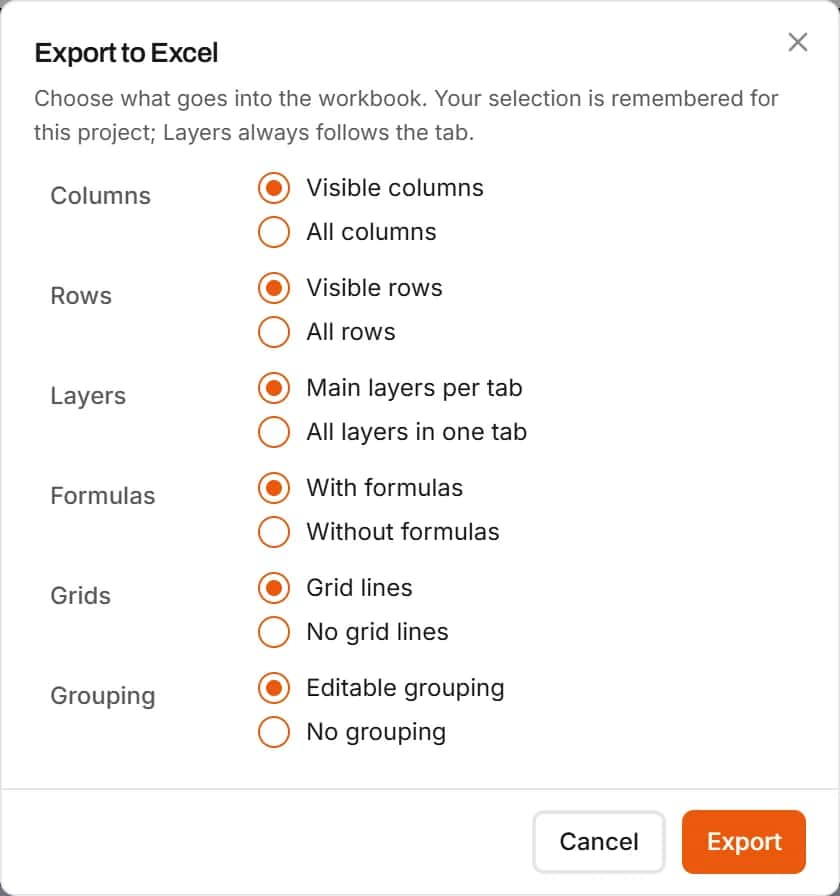
In IntelCost the estimate exports to Excel. You choose visible or all columns and rows, and whether each main layer, such as base bid and alternates, gets its own tab. With formulas on, line costs, totals and sub-item quantities export as live formulas, with sub-items linked to their parent line and to a Dimensions sheet that holds named dimensions such as a slab's thickness. Change the thickness in the workbook and the concrete quantity follows. A full estimate export adds a Bid Summary sheet, and the Quantities only report gives subs a sheet with no prices on it. See Excel export.
A middle path
Many teams settle somewhere in between: measure in takeoff software, where the marks and the scale live, and keep the final pricing or the bid form in Excel. That works well as long as there is one source of truth for quantities. Decide which tool owns them, and never retype a quantity by hand from one to the other. For the order of the final numbers, from direct cost to the bid total, see the bid summary guide.