Guide
Digital Takeoff vs Paper and Excel: How the Work Is Done
The same takeoff done three ways, step by step, and a practical plan for moving from paper or a spreadsheet to digital.
By IntelCost Team · · 6 min read
A takeoff is the same job whichever tool you use: read the drawings, measure lengths, areas and counts, and turn them into quantities you can price. What changes between paper, a spreadsheet and digital takeoff software is how each step gets done, where the scale lives, how a revision is handled, how someone checks your work and how the result gets passed on. This guide walks through each of those, then gives a practical plan for moving to digital without losing what already works.
Three ways to do the same takeoff
On paper
You print the set, or work from the plotted set the owner sent. With a scale ruler set to the sheet's scale, you measure each run and area, mark what you have measured with colored highlighters, and write the figures on a tally sheet or a quantity sheet. A calculator turns the tallies into totals, and the totals go onto a pricing sheet. The marked-up set is the record of what you measured.
In a spreadsheet
The measuring still happens off paper, or with the measure tool in a PDF viewer. The difference is what happens next: each measurement is typed into a row, with columns for the description, the sheet, the dimensions and the unit. Formulas do the extensions, add waste, and carry quantities to a priced estimate on another tab. The spreadsheet is the record of the numbers, but the record of what was measured is somewhere else.
In digital takeoff software
The PDF set is loaded into the program. You set the scale for each sheet, pick a measuring tool and click along the wall, around the slab or on each fixture. The quantity is calculated from the clicks and stored with the marks on the sheet. Items carry their name, unit and classification, and in many programs the quantities flow straight into an estimate. The marks and the numbers are the same record.
Scale handling
Scale is where most takeoff errors start, whichever method you use.
On paper, you match the ruler to the scale printed on each sheet. Half-size prints are the classic trap: an 11 x 17 print of a 22 x 34 sheet is half the printed scale, so 1/4" = 1'-0" becomes 1/8" = 1'-0". Details marked "not to scale" cannot be measured at all; use the dimensions written on them.
In a spreadsheet, the scale lives in your head, or in a note cell nobody updates. The spreadsheet cannot tell whether the 42 you typed came off a half-size print.
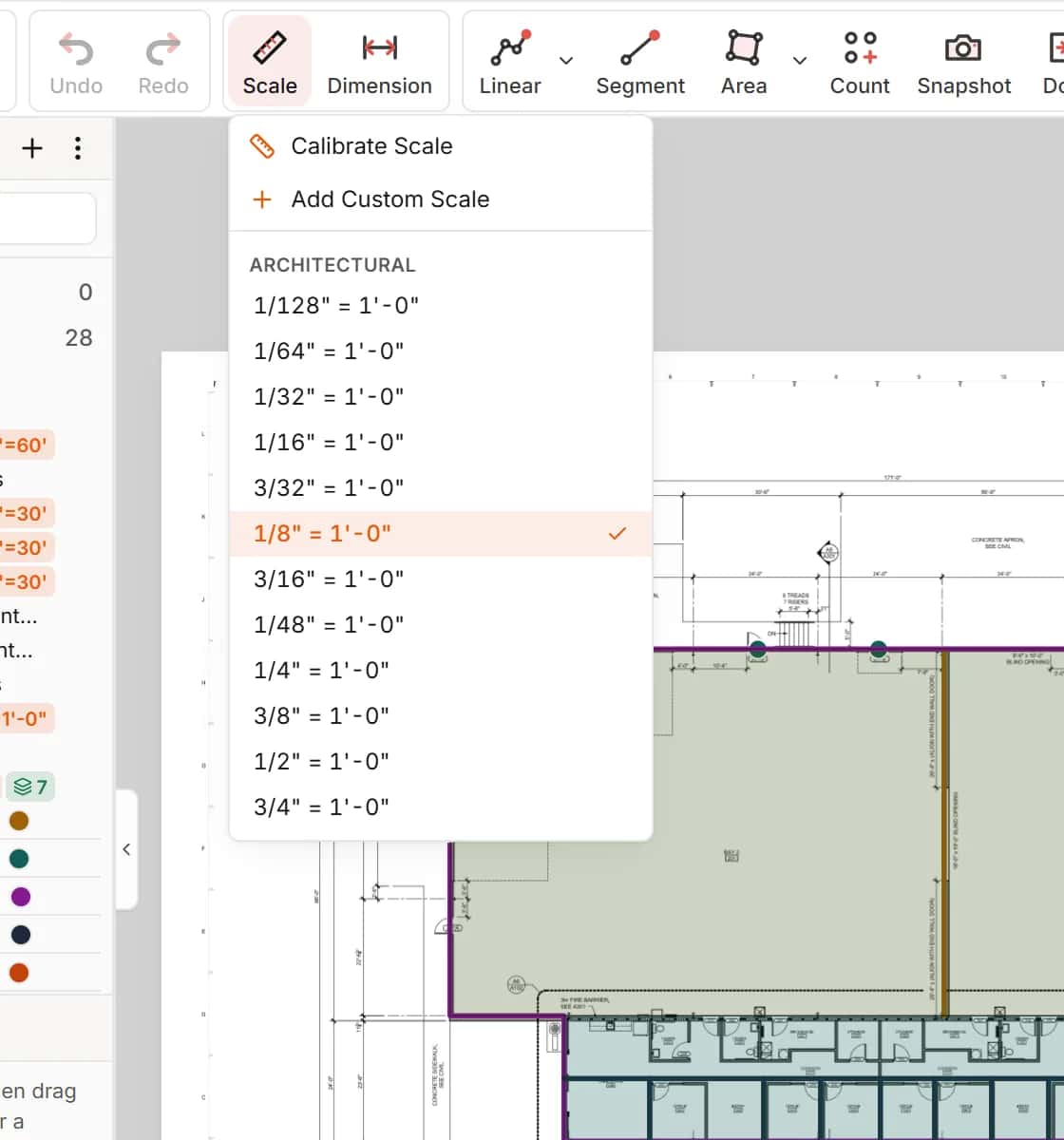
In digital takeoff, each sheet gets a scale once, from a preset or by calibrating against a known dimension. Calibrate against the longest printed dimension you can find, then check a second one in the other direction. If a sheet carries details at different scales, measure them with that in mind and check against a written dimension. Treat the printed scale in the title block as a claim to verify, not a fact: plans get reduced, enlarged and re-plotted.
In IntelCost each sheet keeps its own scale, a sheet with no scale is flagged before anything is measured blind, and the scale printed on a sheet can be read and checked against the dimensions drawn there. See Takeoff.
Revisions and addenda
On paper, a revised sheet means laying the old and new prints side by side, finding the clouds, and re-measuring what changed. Anything outside the clouds that also changed is easy to miss. You then correct the tally sheet and every total downstream.
In a spreadsheet, you find the rows that came from the revised sheet, if the sheet number was recorded, re-measure, and retype. Formulas that pointed at those rows update; anything that was typed as a value does not.
In digital takeoff, the old measurements are still drawn on the sheet, so you can see what was measured on the previous issue. Most programs let you overlay the new sheet on the old one and show additions and deletions in contrasting colors, which covers changes the architect forgot to cloud. You adjust the marks, and the quantities follow.
Whatever the method, keep a revision log: the sheet, the issue date, what changed and which items were touched.
Checking the work
A takeoff nobody can check is a takeoff nobody should bid from.
On paper, the reviewer flips through the highlighted set looking for unmarked work, then re-measures a sample of the largest items. It works, but it depends on the highlighter colors being consistent.
In a spreadsheet, review becomes a formula audit: sum ranges that stop one row short, formulas overwritten by typed numbers, a quantity in LF sitting in an SF column. The reviewer can check the arithmetic but not the measuring.
In digital takeoff, every quantity is tied to a mark on a sheet. The reviewer can open a sheet, see what was measured, spot what was not, and check any length against a printed dimension. Good practice:
- Check the scale on every sheet first.
- Scan each sheet for work that has no marks on it.
- Spot-check the five or ten largest quantities against printed dimensions.
- Read the derived quantities (concrete from slab area and thickness, for example) and confirm the factors.
In IntelCost a reviewer can click a quantity in the estimate to see the formula, its values and the shapes it reads on each sheet.
Sharing and handing off
On paper, the marked-up set is one physical copy. Sharing means scanning it or handing it over.
In a spreadsheet, sharing means emailing a file, and before long there are several: the one the PM edited, the one the estimator kept working on, the one that went out. Agree on one file and one owner.
In digital takeoff, it depends on the program. Installed desktop software keeps project files on a machine or a network drive; cloud software keeps one project that the team opens from wherever they are. Either way, plan how quantities reach subcontractors and the rest of the office, which usually means a quantities-only report or an Excel export.
How to move from paper or a spreadsheet to digital
Switching tools mid-season is risky if you do it all at once. A safer plan:
- Get the right files. Ask for the PDFs the architect and engineers produced, not scans of prints. Vector PDFs measure cleanly and their text can be searched.
- Organize the set first. Name each sheet with its number and title, group sheets by discipline, and set every scale before you measure anything.
- Bring your item list across. Take the headings from your tally sheets or spreadsheet and turn them into items with a name, a unit and a classification. Keep the names your team already uses. The CSI MasterFormat guide is a good backbone if you do not have one.
- Decide where waste and factors live. Put waste, laps and conversion factors on the item, once. Doubling waste (once in the takeoff, again in the spreadsheet) is a common error during the switch.
- Re-take off a finished job. Pick a bid you already did by hand or in Excel and do it again in the software. Compare quantities line by line. Differences usually come from scale, deducts or a convention you had not written down.
- Agree on conventions. Colors per trade, item names, how alternates are kept apart, who reviews what. Write them on one page.
- Run one live bid with a backup. Do a real bid digitally, with an independent check of the major quantities, before you drop the old method.
- Keep Excel where it helps. Bid forms, owner formats and historical cost sheets often stay in Excel. Export to them rather than retyping. The Excel takeoff vs takeoff software page covers when a spreadsheet alone is still the right call.
What does not change
The software measures what you click. Reading the drawings, knowing the specs, spotting scope that falls between trades, applying the right waste and pricing it at the right unit price are still the estimator's job. Digital takeoff changes where the scale lives, how revisions show up and how easily someone else can check your work. The judgment stays with you.
If you are weighing an installed desktop program against cloud software, see IntelCost vs desktop takeoff software.